

My experience in the locksmith industry has given me a direct understanding of the operational challenges that can arise daily. From managing appointment backlogs to coordinating technician availability and responding to urgent service calls, the traditional methods often left me feeling overwhelmed and inefficient. This is precisely why I began to investigate and eventually advocate for the adoption of locksmith scheduling software within my own business. This technology isn’t a silver bullet, but it offers a structured approach to improving workflow, reducing errors, and ultimately enhancing client satisfaction.
The landscape of locksmith services has changed considerably. Clients expect immediate responses, precise arrival times, and transparent communication. Relying on manual scheduling – be it through physical calendars, spreadsheets, or even just memory – often leads to a cascade of problems. I’ve personally seen how a missed appointment or a double-booked technician can erode trust and negatively impact our reputation.
The Limitations of Manual Scheduling
When I first started, my scheduling system consisted of a large whiteboard and a series of sticky notes. This approach quickly revealed its limitations. As the number of calls increased, so did the potential for human error.
Miscommunication and Double Bookings
I distinctly recall an incident where two technicians were dispatched to the same address because a rescheduled appointment wasn’t properly updated across all communication channels. Not only was this a waste of resources, but it also made us look unprofessional to the client. These sorts of overlaps are a common pitfall of manual systems.
Inefficient Routing and Travel Time
Without a clear, visual overview of all ongoing jobs and technician locations, manually assigning tasks often meant technicians were driving excessive distances between jobs. This translated directly into higher fuel costs, increased wear and tear on vehicles, and reduced the number of service calls we could complete in a day. It was inefficient from both a financial and a productivity standpoint.
Difficulty in Managing Urgent Requests
Emergency lockouts are a core part of our business. When a client calls in distress, I need to quickly identify the nearest available technician and dispatch them. With manual systems, this process was often chaotic, involving multiple phone calls and a frantic search through schedules, which delayed our response and exacerbated the client’s stress.
The Evolution of Client Expectations
Clients today are accustomed to the convenience offered by other service industries, whether it’s tracking a food delivery or monitoring the progress of a cab. They expect a similar level of transparency and efficiency from their locksmith.
Real-time Updates and Transparency
I’ve learned that clients appreciate knowing when their technician is en route, who they are, and approximately how long the job will take. Manual systems struggle to provide this level of real-time information without constant, manual updates.
Easy Booking and Rescheduling Options
The ability for clients to book an appointment online or easily reschedule through a few clicks is no longer a luxury; it’s often a baseline expectation. Offering these conveniences can significantly improve the client experience and reduce the administrative burden on my staff who would otherwise spend time on the phone.
Key Features I Look For in Locksmith Scheduling Software
My detailed investigation into various scheduling software options revealed a set of essential features that I found to be particularly beneficial for my locksmith business. These features address the specific pain points I outlined earlier and significantly contribute to a more streamlined operation.
Centralized Scheduling Dashboard
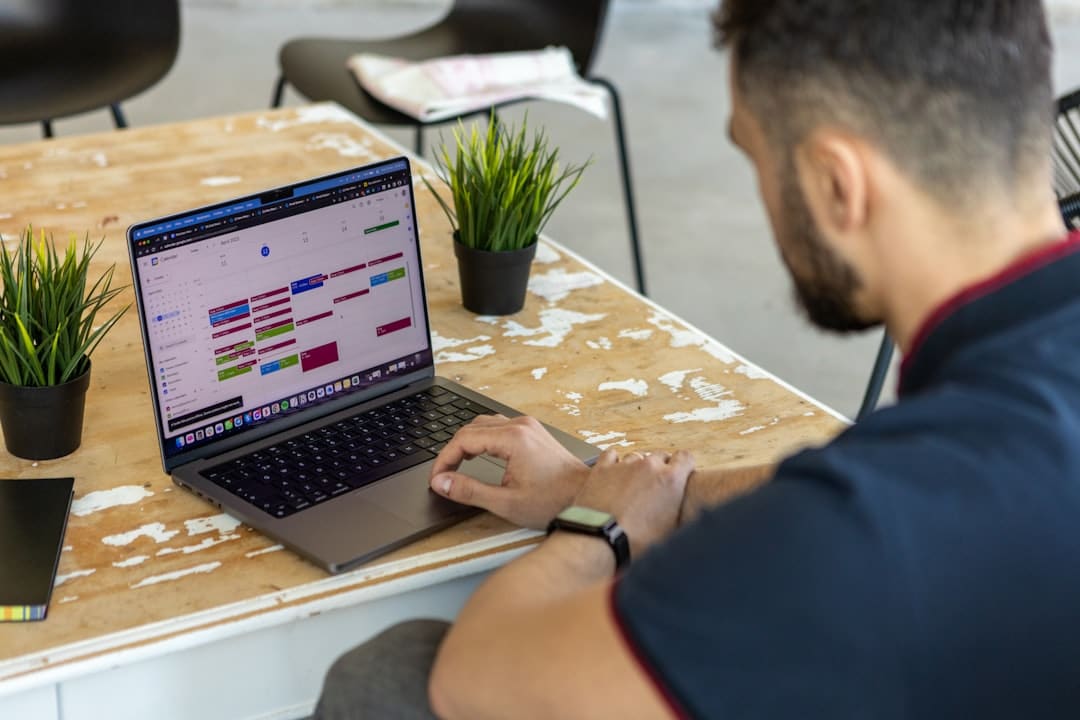
This is, in my opinion, the cornerstone of any effective scheduling software. It provides a comprehensive visual overview of our entire operation.
Drag-and-Drop Appointment Management
The ability to simply drag an appointment from one technician’s schedule to another, or to adjust its time slot, has been incredibly useful. It allows for quick adjustments based on unforeseen circumstances, like a technician running ahead or behind schedule, or a last-minute cancellation.
Color-Coded Job Statuses
Visually distinguishing between jobs that are “pending,” “in progress,” “completed,” or “emergency” provides an immediate understanding of our workload. This helps me prioritize and allocate resources more effectively, especially during peak hours.
Automated Dispatch and Routing
This feature has been a game-changer for improving our response times and operational efficiency.
GPS Tracking and Technician Location
Knowing where each of my technicians is in real-time allows me to deploy the closest available one to urgent calls, drastically cutting down on travel time. This also enhances safety and accountability.
Optimized Route Planning
The software intelligently plans the most efficient routes for technicians, considering traffic, distance, and the order of appointments. This has directly led to reduced fuel consumption and allowed technicians to complete more jobs per day, increasing our overall capacity.
Customer Relationship Management (CRM) Integration
Integrating scheduling with client information has provided a much richer and more personalized service experience.
Client History and Preferences
Having immediate access to a client’s service history – what work was done, on what type of lock, and any specific preferences – allows my technicians to arrive prepared and offer tailored advice. It prevents the need for clients to repeat information, which they appreciate.
Automated Reminders and Notifications
The system sending out automated appointment reminders via SMS or email significantly reduces no-shows, which are costly in terms of both lost revenue and wasted technician time. I also use it to send post-service follow-ups, which helps maintain client relationships.
Enhancing Operational Efficiency and Productivity
The adoption of locksmith scheduling software has translated directly into tangible improvements across various aspects of my business operations. I’ve observed a marked increase in efficiency and a noticeable boost in overall productivity.
Reduced Administrative Burden
Prior to implementing the software, a significant portion of my day was dedicated to administrative tasks related to scheduling. This time is now freed up for other critical aspects of the business.
Minimizing Phone Calls for Scheduling
Clients can now book appointments online directly, or my staff can easily manage requests through the digital platform. This has drastically reduced the number of inbound calls solely for scheduling purposes, allowing my administrative staff to focus on more complex inquiries or other support functions.
Eliminating Paperwork and Manual Data Entry
I used to spend hours deciphering handwritten notes and transcribing information from various sources. The software has centralized all data entry, making it more accurate and less time-consuming. This reduction in manual data entry also significantly reduces the potential for human error.
Data-Driven Decision Making
The software collects a wealth of data that I now leverage to make more informed business decisions.
Performance Metrics and Reporting
I can easily generate reports on technician performance, average job completion times, busiest periods, and client satisfaction rates. This data helps me identify areas for improvement, recognize high-performing employees, and allocate resources more strategically. For example, I can see which types of jobs are most profitable or which areas require more technician coverage.
Identifying Bottlenecks and Opportunities
By analyzing scheduling patterns and technician availability, I can identify potential bottlenecks before they impact our service delivery. This insight allows me to proactively adjust staffing levels, refine our service offerings, or even explore new market opportunities based on demand.
Improved Resource Allocation
Precise management of my technicians and equipment is crucial for maximizing profitability and ensuring timely service delivery.
Maximizing Technician Utilization
The software helps us ensure that technicians are consistently engaged, with optimized routes and minimized downtime between jobs. This means more completed service calls per day per technician, directly contributing to increased revenue. It allows me to see if a particular technician is consistently underutilized and provides an opportunity to address that.
Inventory Management for Service Vehicles
While not a primary feature of all scheduling software, some platforms offer integrations or modules for basic inventory tracking. This helps me ensure that my service vehicles are adequately stocked with the necessary parts and tools for common jobs, reducing the need for technicians to return to the shop for supplies, which wastes valuable time.
Enhancing Customer Satisfaction and Retention
Ultimately, the goal of any business improvement is to better serve the client. Locksmith scheduling software has proven instrumental in elevating our client experience, which in turn leads to greater loyalty and repeat business.
Professional and Reliable Service Delivery
Consistency and reliability are key differentiators in the service industry. The software helps us deliver on these promises every time.
Punctuality and Reduced Wait Times
With optimized routes and accurate scheduling, our technicians arrive closer to the estimated time, reducing client waiting periods and frustrations. When delays do occur, the system facilitates prompt communication, managing client expectations effectively.
Personalized Communication and Follow-ups
Beyond automated reminders, the ability to store client notes and preferences allows technicians to offer a more personalized service. Post-service follow-ups, powered by the software, reinforce our commitment to client satisfaction and provide an opportunity to solicit feedback.
Seamless Booking and Transparent Communication
Making the process of booking a locksmith service as frictionless as possible is a significant boon for client satisfaction.
Online Booking Portal for Convenience
Offering a 24/7 online booking portal caters to clients who prefer to schedule appointments outside of business hours. It empowers them to choose a time that suits them, reducing the back-and-forth typical of phone-based scheduling. From my perspective, this also reduces the burden on my administrative staff during peak call times.
Real-time Updates and Technician Tracking
Clients receive automated notifications regarding their appointment status, including an estimated time of arrival (ETA) and even a link to track their technician’s location. This level of transparency dramatically improves the client experience and provides me with a competitive advantage. I’ve often received positive feedback directly from clients regarding this specific feature.
Implementation and Adoption Strategies I Found Effective
| Features | Benefits |
|---|---|
| Online booking | Allows customers to schedule appointments at their convenience |
| Employee scheduling | Efficiently manage and assign work to locksmiths |
| Job tracking | Keep track of ongoing and completed jobs |
| Customer database | Store customer information for easy access and communication |
| Payment processing | Securely accept payments for services rendered |
Introducing new technology into an established business can present challenges, but with careful planning and execution, the transition can be smooth and ultimately rewarding. My experience has taught me that effective implementation is just as crucial as selecting the right software.
Gradual Rollout and Training
I’ve learned that attempting a wholesale, immediate switch can lead to confusion and resistance. A phased approach is more manageable.
Pilot Program with Key Personnel
I started by training a small group of my most tech-savvy technicians and administrative staff on the new software. Their initial feedback was invaluable for identifying potential issues and refining our internal processes before a wider rollout. This also created internal champions who could support their colleagues.
Comprehensive Training Sessions
Once the pilot was successful, I organized dedicated training sessions for all staff. These weren’t just about clicking buttons; they focused on how the software would genuinely improve their daily workflow and benefit the overall business. I made sure to allocate sufficient time for questions and hands-on practice.
Encouraging User Adoption
Simply providing the software is not enough; I needed to actively encourage and support its regular use.
Highlighting Benefits for Staff
I consistently communicated how the software would make their jobs easier – less paperwork for administrative staff, more efficient routing for technicians, and fewer missed appointments for everyone. Focusing on these direct benefits helped foster a positive attitude towards the change.
Providing Ongoing Support and Feedback Channels
I established a clear channel for staff to report issues, ask questions, and provide suggestions. Regular check-ins and open discussions created a sense of ownership among the team, making them more invested in the success of the new system. Addressing their concerns promptly was also critical in maintaining morale and engagement.
Measuring Success and Iterating
Implementing technology is an ongoing process of refinement. I continuously monitor its impact.
Tracking Key Performance Indicators (KPIs)
I regularly review metrics such as average response time, technician utilization rates, gas mileage, and client satisfaction scores. This data helps me objectively assess the impact of the software and identify areas where we can further optimize its use. For instance, if I notice a consistent drop in punctuality for certain types of jobs, I can investigate if it relates to a scheduling flaw or an external factor.
Soliciting Feedback from Clients
I also actively solicit feedback from my clients regarding their experience, particularly in relation to the booking process and communication. Their insights are invaluable for understanding if the technological improvements are truly enhancing their service experience and meeting their expectations. This helps me ensure that the software is not just making my operations easier, but also adding tangible value to my customer interactions.
