


Effective platform workflow management is crucial for maintaining productivity and achieving project objectives. This guide outlines strategies and techniques to enhance efficiency across various digital platforms, focusing on practical application rather than theoretical abstractions. By adopting these methods, individuals and teams can streamline their processes, reduce friction, and optimize their output.
Before implementing changes, a thorough understanding of the existing workflow is essential. Without a clear picture of how tasks currently flow, any attempts at optimization risk being misdirected or ineffective. Think of your current workflow as a tangled ball of string; to untangle it, you must first identify each individual strand and its path.
Mapping Your Processes
The initial step involves documenting every stage of your platform usage. This can range from the submission of a new content piece to the deployment of a software update. Visualizing these processes, perhaps through flowcharts or swimlane diagrams, can reveal bottlenecks and redundancies that might otherwise go unnoticed.
- Identify Key Stakeholders: Who is involved at each stage? What are their responsibilities?
- Document Input and Output: What information or resources enter a stage, and what is produced as a result?
- Trace Decision Points: Where do choices need to be made, and what are the potential paths stemming from those choices?
Identifying Bottlenecks and Inefficiencies
Once mapped, the workflow becomes a diagnostic tool. Areas where tasks frequently stall, require excessive manual intervention, or produce errors are prime candidates for optimization. These bottlenecks often act as chokepoints, significantly impeding the overall progress.
- Time-consuming Tasks: Are there steps that consistently take longer than expected?
- Frequent Rework: Do tasks often need to be redone due to errors or incomplete information?
- Approval Delays: Are there stages where approvals are consistently awaited, delaying downstream activities?
- Resource Contention: Are multiple tasks vying for the same limited resources (human or technical)?
Establishing Baseline Metrics
To quantify subsequent improvements, it is necessary to establish baseline metrics for key performance indicators (KPIs). Without measurable data, determining the efficacy of implemented changes becomes purely anecdotal.
- Cycle Time: The total time taken from the start to the completion of a specific task or process.
- Throughput: The number of tasks or items completed within a given time frame.
- Error Rate: The frequency of mistakes or defects occurring within the workflow.
- Resource Utilization: The proportion of time or capacity that resources are actively engaged in productive work.
Leveraging Platform Features and Integrations
Modern digital platforms are often equipped with a suite of features and integration capabilities designed to enhance productivity. Ignoring these embedded tools is akin to building a house with a hammer when power tools are readily available.
Automation of Repetitive Tasks
Many platform workflows involve repetitive, low-value tasks that can be automated, freeing up human resources for more complex, cognitive work. This extends beyond simple script execution to include built-in platform functionalities.
- Scheduled Reports: Configure platforms to generate and distribute reports automatically at predetermined intervals.
- Conditional Triggers: Set up rules where specific actions are initiated upon the occurrence of a predefined event (e.g., an email notification when a file is uploaded).
- Data Synchronization: Automate the transfer and synchronization of data between different platform modules or external applications.
- Form Field Pre-population: Design forms to automatically fill in known data fields, reducing manual input errors and time.
Utilizing Keyboard Shortcuts and Customization
For knowledge workers who spend extensive time interacting with platforms, mastering keyboard shortcuts can significantly reduce interaction time. Customization options, such as personalized dashboards and templates, further tailor the platform to individual work styles and recurring task needs.
- Standardized Shortcuts: Familiarize yourself with the common shortcuts for navigation, editing, and task execution within your primary platforms.
- Custom Keybindings: Where available, configure custom keybindings for frequently performed actions that lack default shortcuts.
- Interface Personalization: Arrange platform interfaces to prioritize frequently accessed tools and information, minimizing visual clutter and search time.
- Template Creation: Develop and utilize templates for recurring documents, reports, or project setups, ensuring consistency and accelerating initial task stages.
Exploring API and Third-Party Integrations
Many platforms offer Application Programming Interfaces (APIs) that allow for custom integrations with other software. This creates a more cohesive digital ecosystem, eliminating the need for manual data transfer or task switching between disparate applications.
- Workflow Orchestration Tools: Integrate platforms with tools like Zapier, Make (formerly Integromat), or custom scripts to build multi-step automated workflows across different services.
- Reporting and Analytics Dashboards: Connect platform data to business intelligence tools (e.g., Tableau, Power BI) for advanced visualization and analysis.
- Communication Platforms: Integrate task management systems with communication tools (e.g., Slack, Microsoft Teams) to automatically post updates or alerts.
- Version Control Integration: For development platforms, ensure integration with version control systems (e.g., Git) to streamline code management and deployment processes.
Streamlining Communication and Collaboration
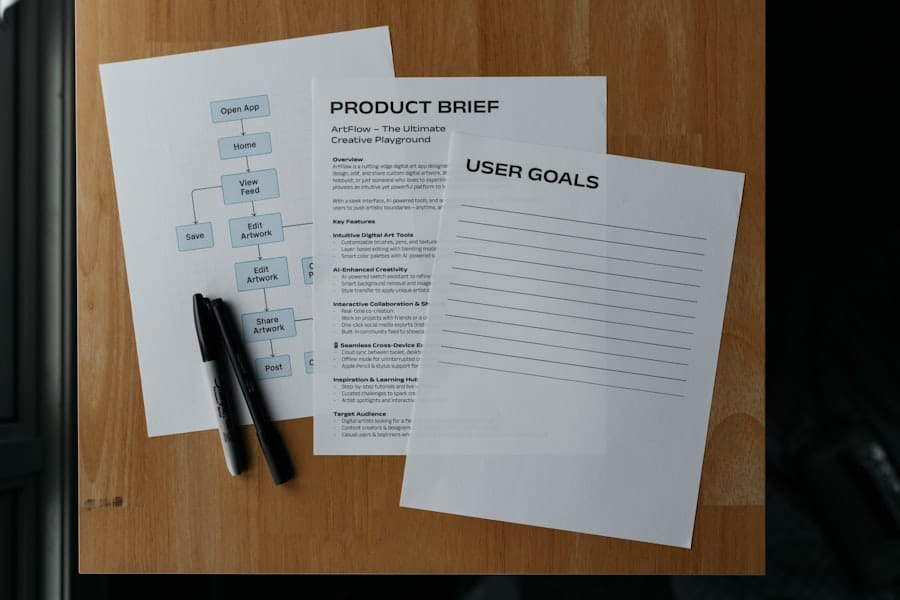
Communication is the lubricant of any workflow. Ineffective communication acts as grit in the gears, slowing down progress and increasing the likelihood of errors. Platforms often provide tools to facilitate clear and concise interactions.
Centralized Communication Channels
Dispensing with fragmented communication across multiple email threads, chat applications, and informal conversations is paramount. A centralized channel ensures that all relevant stakeholders have access to the same information, promoting transparency and reducing information silos.
- Dedicated Project Channels: Establish distinct channels within communication platforms for each project or specific workflow, keeping discussions focused.
- Platform-Based Comments and Discussions: Utilize the comment features embedded within project management platforms or documentation systems to keep discussions contextually relevant to the task at hand.
- Meeting Agendas and Minutes: Document meeting agendas and decisions within a shared platform, ensuring that action items are clear and traceable.
- Knowledge Bases: Create and maintain a centralized knowledge base for frequently asked questions, standard operating procedures, and platform-specific guides.
Clear Roles and Responsibilities
Ambiguity regarding who is responsible for what can lead to duplicated efforts or, conversely, tasks being overlooked. Clearly defined roles and responsibilities act as a compass, guiding individuals to their specific contributions within the workflow.
- RACI Matrix: Employ a Responsibility Assignment Matrix (Responsible, Accountable, Consulted, Informed) to delineate roles for key tasks.
- Documentation of Ownership: Clearly state task ownership within project management tools or documentation, making it easy to identify who is progressing specific items.
- Regular Role Reviews: Periodically review and update role descriptions, especially in dynamic environments where responsibilities may evolve.
- Delegation Guidelines: Establish clear guidelines for delegation, empowering team members while maintaining accountability.
Feedback Loops and Iteration
Workflows are rarely perfect from inception. Establishing robust feedback loops allows for continuous refinement and adaptation. Iterative improvements, like sanding down rough edges on a piece of wood, ultimately lead to a smoother, more polished product.
- Post-Mortem Analysis: Conduct reviews after critical projects or workflow cycles to identify what went well and what could be improved.
- Regular Check-ins: Implement routine meetings or communication points for teams to discuss progress, roadblocks, and potential workflow adjustments.
- User Feedback Mechanisms: Provide easy ways for users and team members to submit suggestions or report issues with the current workflow.
- A/B Testing Workflow Variations: For critical pathways, experiment with different workflow configurations (A/B testing) to empirically determine the most efficient approach.
Implementing Project Management Methodologies

Adopting structured project management methodologies can provide a framework for organizing tasks, tracking progress, and managing resources within platforms. These methodologies act as a blueprint, guiding the construction of an efficient workflow.
Agile and Scrum Principles
Agile and Scrum methodologies emphasize iterative development, flexibility, and continuous improvement, making them well-suited for dynamic platform-based projects.
- Sprints: Break down work into short, time-boxed iterations (sprints), typically 1-4 weeks, with specific goals.
- Daily Stand-ups: Conduct brief daily meetings to discuss progress, obstacles, and plans for the day, fostering transparency and accountability.
- Backlog Management: Maintain a prioritized list of tasks (product backlog) that needs to be completed, dynamically adjusting priorities as needed.
- Retrospectives: At the end of each sprint, hold retrospective meetings to reflect on the process, identify areas for improvement, and implement changes for the next sprint.
Kanban Boards for Visual Workflow Management
Kanban boards provide a visual representation of the workflow, allowing teams to track tasks from initiation to completion. The visual nature makes it easy to spot bottlenecks and manage work in progress.
- Columns Represent Stages: Each column on the board represents a stage in the workflow (e.g., “To Do,” “In Progress,” “Review,” “Done”).
- Cards Represent Tasks: Individual tasks or work items are represented by cards that move across the board.
- WIP Limits: Implement Work-in-Progress (WIP) limits for each column to prevent overburdening team members and to highlight bottlenecks.
- Flow Metrics: Use Kanban metrics like lead time, cycle time, and throughput to continuously monitor and improve the workflow’s efficiency.
Gantt Charts for Long-Term Planning
While Agile and Kanban excel in iterative work, Gantt charts remain valuable for visualizing project timelines, dependencies, and critical paths, especially for projects with fixed deadlines and sequential tasks.
- Task Breakdown: Deconstruct projects into smaller, manageable tasks.
- Dependency Mapping: Identify and link tasks that depend on the completion of others, ensuring proper sequencing.
- Milestone Definition: Set key milestones to mark significant progress points within the project.
- Resource Allocation: Visually assign resources to tasks, aiding in workload balancing and preventing overallocation.
Continuous Monitoring and Optimization
| Metric | Description | Value | Unit | Last Updated |
|---|---|---|---|---|
| Average Task Completion Time | Average time taken to complete a workflow task | 45 | minutes | 2024-06-01 |
| Workflow Success Rate | Percentage of workflows completed without errors | 98.5 | % | 2024-06-01 |
| Number of Active Workflows | Count of workflows currently in progress | 120 | workflows | 2024-06-01 |
| Average User Actions per Workflow | Average number of user interactions per workflow | 8 | actions | 2024-06-01 |
| Workflow Automation Rate | Percentage of workflows automated vs manual | 75 | % | 2024-06-01 |
Workflow optimization is not a one-time event but an ongoing process. Platforms and needs evolve, requiring continuous monitoring and adaptation of the workflow. Think of your workflow as a garden; it requires constant tending, weeding and pruning to flourish.
Establishing Performance Metrics
Revisiting the baseline metrics established earlier, regular monitoring of these KPIs is essential to assess the impact of implemented changes. This data-driven approach avoids subjective assessments of improvement.
- Dashboard Creation: Build customizable dashboards within your platform or a separate analytics tool to provide real-time visibility into key workflow metrics.
- Automated Reporting: Schedule regular reports on performance metrics to be distributed to relevant stakeholders, fostering awareness and accountability.
- Alerts and Notifications: Configure alerts for significant deviations from expected performance, allowing for proactive intervention.
Regular Workflow Audits
Periodic audits of the workflow help identify areas where efficiency has degraded or where new opportunities for optimization have emerged. This proactive approach prevents complacency and ensures sustained improvement.
- Process Walkthroughs: Periodically walk through the entire workflow with key stakeholders to identify any deviations from the documented process or emerging inefficiencies.
- User Surveys and Interviews: Gather qualitative feedback from individuals who regularly use the platform and participate in the workflow to understand their pain points and suggestions.
- Technology Review: Assess whether the platform itself or its integrated tools are still meeting the workflow’s demands, considering upgrades or alternative solutions if necessary.
Adaptability and Iterative Improvement Cycles
The digital landscape is in constant flux. Workflows must be designed with an inherent capacity for adaptation. Embracing an iterative improvement cycle ensures that workflows remain responsive to changing requirements and technological advancements.
- Pilot Programs: Before rolling out major workflow changes across the entire organization, pilot them with a smaller group to gather feedback and refine the process.
- Documentation Updates: Maintain up-to-date documentation for all workflow processes, reflecting any changes or optimizations.
- Training and Onboarding: Ensure that all team members are adequately trained on new workflow processes or platform features to maximize adoption and minimize disruption.
- Cultivating a Culture of Feedback: Encourage all team members to proactively identify and suggest improvements, fostering a collective responsibility for workflow efficiency.
By adopting these strategies, individuals and organizations can transform their platform usage from a series of disjointed actions into a cohesive, efficient workflow that consistently delivers results. The objective is not merely to work faster, but to work smarter, leveraging the capabilities of digital platforms to their fullest extent.
